CWR Converter- Quick Start
Turn raw Common Works Registration (CWR v2.1 / v2.2) files into human-readable tables and custom reports—all inside your browser.
Example Workflow
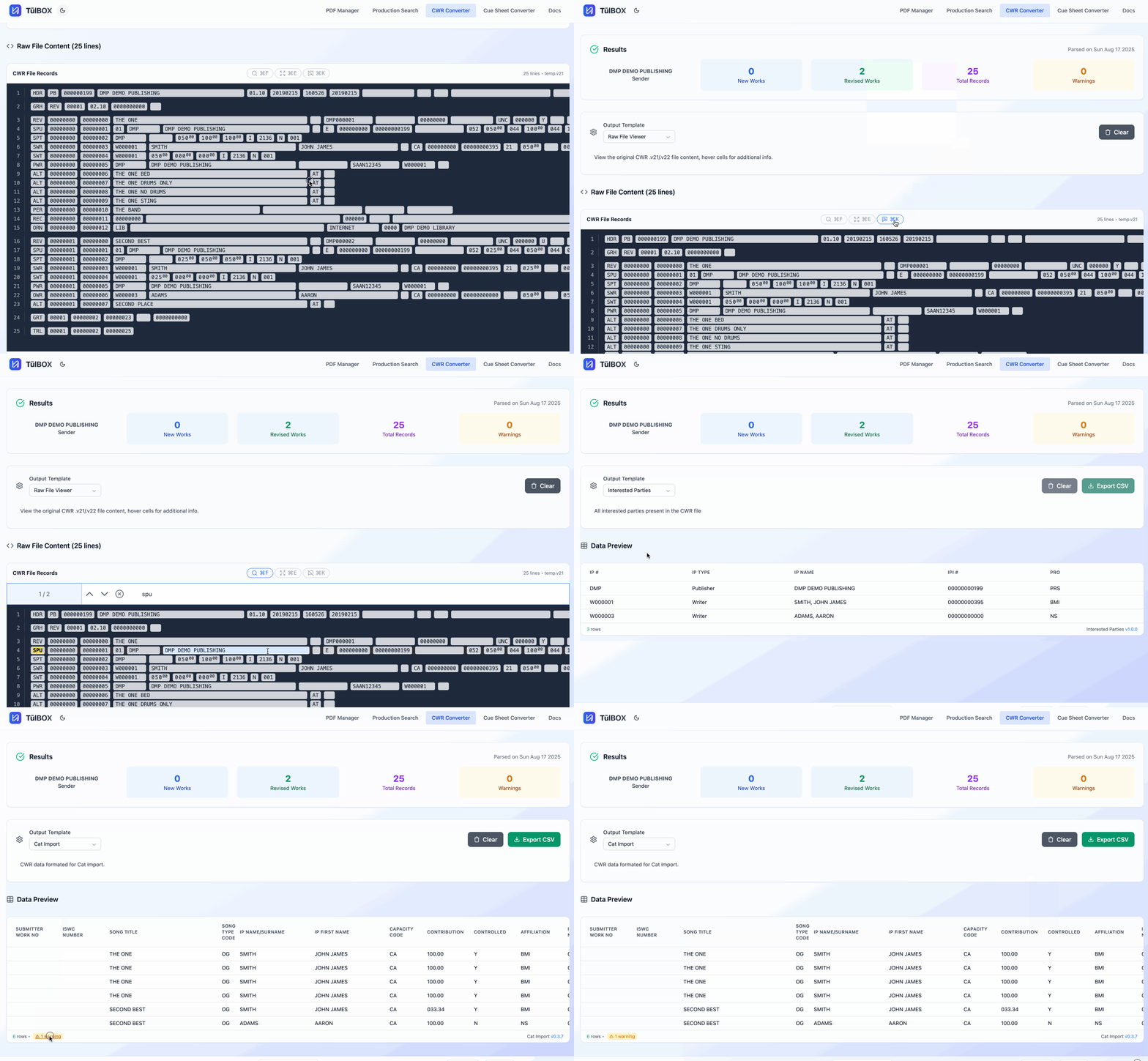
1 · Upload a CWR file
- Drag-and-drop or Browse for a
.v21or.v22file (up to 100 MB). - The parser validates the header and record structure before rendering.
Heads-up: Large files parse synchronously—keep the tab in focus to avoid throttling.
All processing happens entirely in your browser, so your data never leaves your machine. Because everything runs locally, the maximum file size the tool can handle depends on your computer's memory and processing power. A typical work-issued PC can handle ~100Mb. If you have files larger than this, reach out, or download the CLI version.
2 · Explore in Raw Viewer
| Feature | What it does |
|---|---|
| Field-info tooltips | Hover any cell to see the CWR spec name, length, and description. Toggle on/off in the toolbar. |
| Full-screen mode | Click Maximise to dedicate the full viewport to the raw grid—ideal for multi-monitor setups. |
| Global search | Find any text across all records (supports RegExp). Matches are highlighted and the grid scrolls automatically. |
| Lazy rendering | Rows are virtualized, so even 100k-line files stay snappy. |
3 · Generate a report
- Open the Report Generator panel.
- Pick a template (e.g. ISRCs, Interested Parties, Cat Import). Templates are versioned and updated automatically.
- Runs Automatically - the tool walks the CWR hierarchy and flattens the data into a tabular view.
Report-Specific logic
Most reports simply use the data as provided in the CWR file. Any reports that have additional logic applied will be listed here:
- Cat Import
- This report is currenlty in development.
- Data is repeated as necessary based on AKAs.
- Composer percentages are adjusted by
0.01up or down if necessary.
Want a different aggregation? Fork an existing template or send a feature request—basic templates are just TypeScript object definitions.
{
  id: 'msg-report',
  version: '0.0.2',
  name: 'Message Records',
  description: 'All message records present in the CWR file',
  fields: [
    { key: 'transactionSeqNum', label: 'Tran Seq #', type: 'numeric', width: 75, },
    { key: 'recSeqNum', label: 'Rec Seq #', type: 'numeric', width: 75 },
    { key: 'ogRecSeqNum', label: 'OG Rec Seq #', type: 'numeric', width: 75 },
    { key: 'ogRecType', label: 'OG Rec Type', type: 'string', width: 100 },
    { key: 'msgLevel', label: 'Msg Level', type: 'string', width: 75 },
    { key: 'validationLevel', label: 'Valication Level', type: 'string', width: 100, },
    { key: 'msgText', label: 'Message', type: 'string', width: 600 },
  ],
},
4 · Export
Click Export → CSV to download the current report. Column headers follow the template spec and data types are preserved (e.g. sequences are considered numeric in the CWR spec and will treated as a number on export).
Upcoming Features
- Template diffing - Hover the template name to see its changelog.
- Errors/Warning View - Click the errors/warnings at the bottom of the report or raw view to see the details.
Need a custom report or run into a parsing edge-case? 📧 brandon@tulbox.app · Subject: CWR Tool Feedback